Cloud Infrastructure > Overview
Overview
Visual diagrams of Webiny's cloud infrastructure for Core, API, and Admin Area.
- What cloud infrastructure resources Webiny deploys
- How Core, API, and Admin Area infrastructure are organized
- What AWS services power each project application
Overview
Webiny deploys to AWS using three project applications: Core, API, and Admin Area. Each has its own infrastructure stack with specific AWS resources.
In the following sections, we provide infrastructure diagrams and resource descriptions for each project application.
For brevity, diagrams don’t include network-level resources like VPC, availability zones, and subnets. See Deployment Modes for network architecture details.
Core
The Core project application provides stateful resources that both API and Admin Area rely on, including databases, file storage, authentication, and event messaging.
Core Resources
Amazon DynamoDB
Primary database for all application data. Webiny uses a single-table design where all applications store data in one table with distinct primary and secondary keys.
When using DynamoDB + OpenSearch, a second DynamoDB table is deployed specifically for syncing data to OpenSearch. DynamoDB Streams trigger Lambda functions that propagate changes from the primary table to OpenSearch.
A separate DynamoDB table is used for storing audit logs.
Amazon S3
File storage for Webiny’s File Manager. Stores all uploaded files and provides secure serving and image resizing capabilities.
Amazon Cognito
Default identity provider for user authentication. Webiny also supports integrating external identity providers (like Okta, Auth0, or custom OAuth providers) alongside or instead of Cognito.
Amazon EventBridge
Event bus for communication between different cloud infrastructure resources.
Amazon OpenSearch Service
Advanced search and filtering for content. Only deployed when using the DynamoDB + OpenSearch database setup.
Learn more about DynamoDB-only vs DynamoDB + OpenSearch setups in Database Setups.
Core Diagram
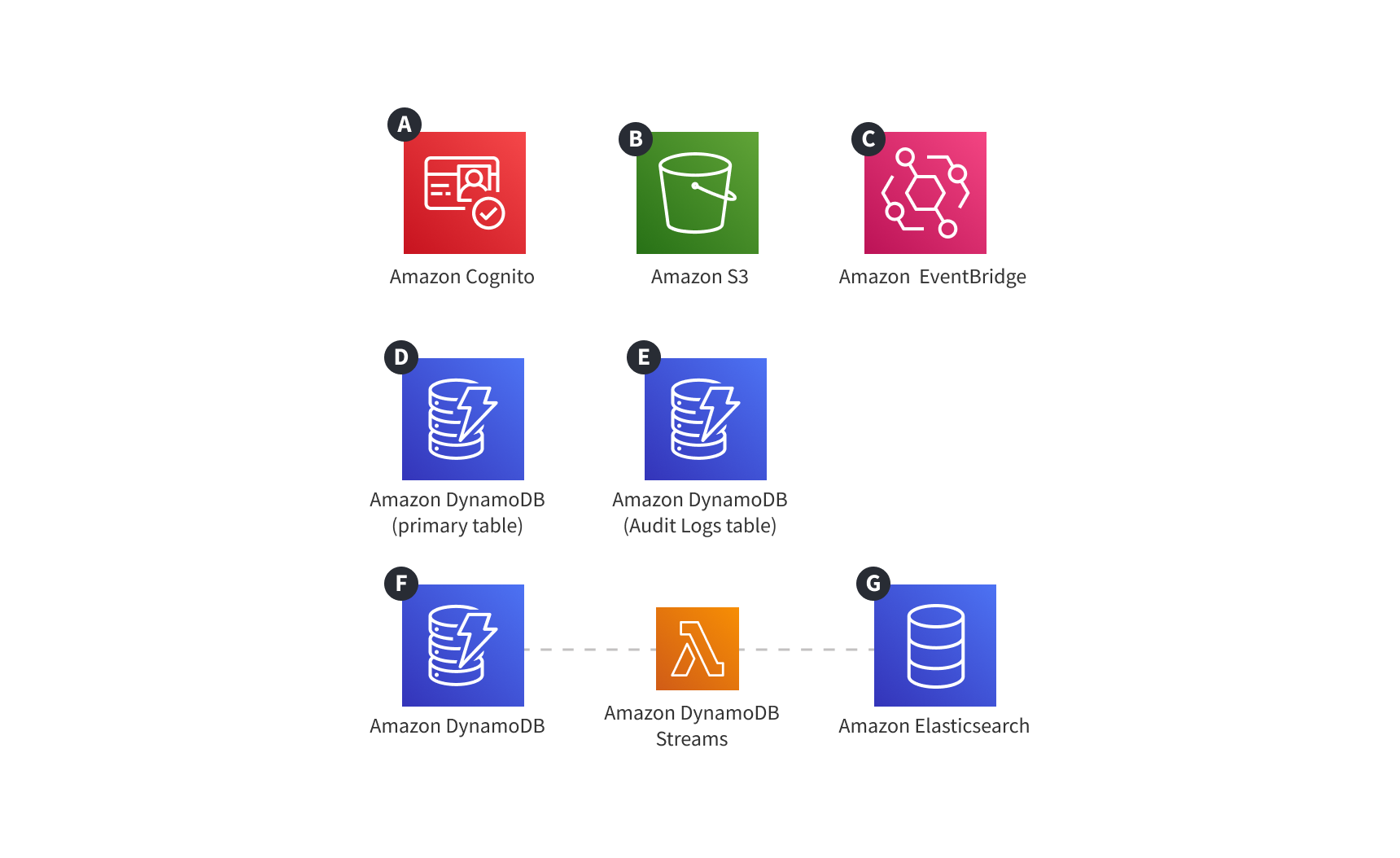 Webiny Cloud Infrastructure - Core Resources
API
The API project application is your GraphQL API, used by the Admin Area. It consists of multiple AWS Lambda functions handling GraphQL requests, file operations, background tasks, and more.
API Resources
Amazon API Gateway
Two API Gateways are deployed:
- HTTP API - Routes GraphQL requests, file uploads/downloads, and other API endpoints to Lambda functions
- WebSocket API - Provides real-time communication for live updates in the Admin Area
AWS Lambda Functions
- GraphQL Handler - Processes GraphQL queries and mutations
- File Upload/Download - Handles file operations and image optimization
- Background Tasks - Executes long-running jobs
- Import/Export - Manages bulk data operations
AWS Step Functions
Orchestrates background task execution. Step Functions coordinate multi-step workflows and long-running processes.
API Diagram
Stateful resources like S3, Cognito, DynamoDB, and OpenSearch are shown for clarity but are deployed as part of the Core project application.
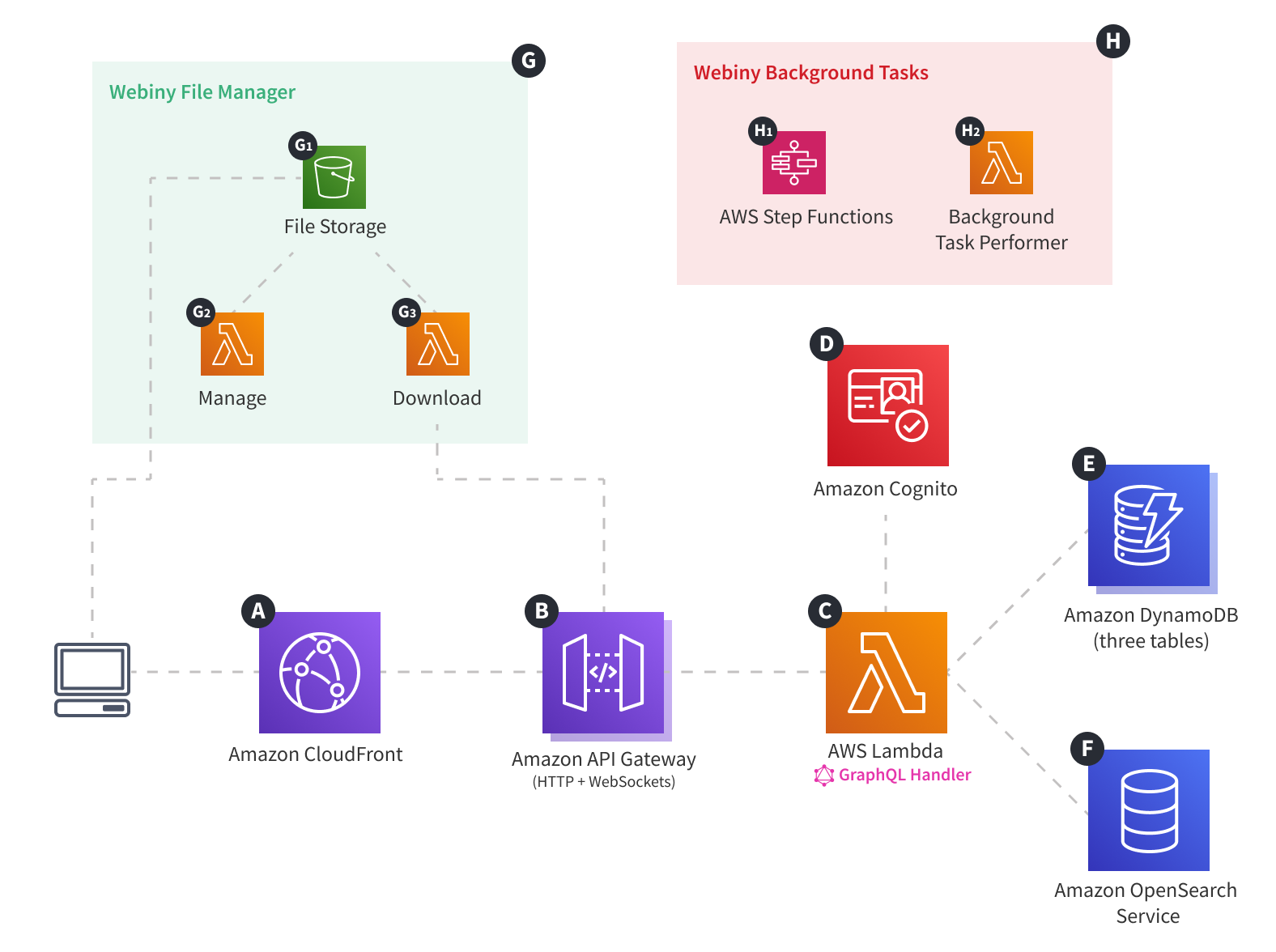 Webiny Cloud Infrastructure - API
Admin Area
The Admin Area is a React single-page application (SPA) hosted entirely on AWS using Amazon CloudFront and Amazon S3. This simple, cost-effective architecture is ideal for SPAs because all application logic runs in the browser, requiring only static file hosting.
Admin Area Resources
Amazon CloudFront
CDN distribution that serves files globally from edge locations.
Amazon S3
Object storage bucket containing the built React application (HTML, JavaScript, CSS, images).
Admin Area Diagram
 Webiny Cloud Infrastructure - Admin Area
FAQ
Why Lambda Instead of AWS AppSync?
Using Lambda for the GraphQL handler provides:
- Customization - Full control over request/response handling
- Testing - Easy unit testing with standard JavaScript tools
- Flexibility - Applications can modify schema based on context (locale, tenant, etc.)
- Portability - Easier to support multiple cloud providers in the future
Which API Gateway Type?
Webiny deploys two API Gateways:
- HTTP API - Handles GraphQL requests and standard API operations
- WebSocket API - Enables real-time features like live refresh in the Admin Area (content updates appear without page refresh)